 Watch the video on YouTube
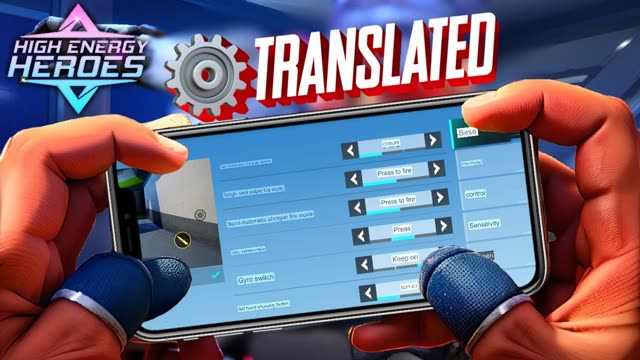
High Energy Heroes is often called Apex Mobile 2.0, and the whole menu is in Chinese. Here is what each setting does, so you can set up your 3- or 4-finger controls without guessing. I play on an iPhone 12 Pro Max with 4 fingers plus gyroscope.
What High Energy Heroes is
High Energy Heroes is a hero battle royale from Tencent Games, released in China in September 2023. It was announced in June 2023 as the China version of the Apex-style game, the same year EA shut down Apex Legends Mobile, and it plays very similarly: squads drop into a sci-fi map, loot weapons and fight to be the last team standing. Each hero has an assault or support role and their own combat skills, with fast movement like sliding and mantling.
It is still only released in China, and it still gets regular updates: app listings show new versions through 2026. There is no confirmed global version.
Basic settings
- Automatic fire
- Fires by itself as soon as your aim is on an enemy.
- One-tap scope and fire
- Scopes in and fires together. Very useful for 2-finger players.
- Single-shot sniper and semi-auto shotgun
- Fire on press, or on release.
- Scope (ADS) mode
- Hold, tap, or both.
- Gyroscope
- Off, while firing, scope only, or always on.
- Left-hand fire button
- Turn it on if you are left-handed.
Advanced settings
- Aim assist: your choice.
- Third-person view: set it to 100% for a wider view of the area.
- Ability zoom, FOV and screen shake.
- Fire button rotation: the fire button also turns your view. Helps 2-finger players.
- Auto assist: switch weapons automatically when you run out of ammo, and keep throwing grenades like arc stars and thermites.
- Quick tactical and ultimate controls.
Movement and wall jump
Joystick options include trigger area, auto-sprint, position, and swipe up on crouch to jump. Wall jumping is easier than it was in Apex Legends Mobile:
- Turn the wall jump setting on.
- Sprint toward a wall or any object.
- Hold the jump button. Do not tap it; it only works when you hold.
Turn on the zipline options too, and adjust them to taste.
Pickups and combat info
Choose automatic or manual pickup and how many heals, batteries and ammo to carry. In combat info you can turn on hit markers, damage numbers and the enemy status bar.
HUD, sensitivity and graphics
- HUD: tap the first preset for a ready 3-finger or 4-finger layout. TDM has its own layout, and you can copy your classic layout across.
- Sensitivity: set it to your own feel.
- Graphics: put FPS on the highest option for smooth play. The rest is preference.
- Finish by checking sound and privacy settings.
Which setup to use: 2, 3 or 4 fingers
- 2 fingers (thumbs only)
- Turn on one-tap scope and fire, plus fire button rotation, so one thumb can aim, scope and shoot. Automatic fire also helps here. This is the easiest setup to start with, but it is hard to move, jump and shoot at the same time.
- 3 fingers
- Add your left index finger for jump or crouch, placed at the top left of the screen. You can now jump and slide while shooting, which matters a lot in an Apex-style game.
- 4 fingers
- Both index fingers on the top of the screen, usually jump and crouch on the left and fire on the right. Your right thumb is then free to aim all the time. It takes a week or two to learn but gives the most control. Pair it with gyroscope for fine aim.
Tip Pick the 3- or 4-finger preset in the HUD settings first, then move single buttons to fit your hands. Starting from a preset is much faster than building a layout from scratch.
Setting up gyroscope
- In the basic settings, set the gyroscope to "scope only" if you are new to gyro, or "always on" if you already use it in other games.
- Start with a low gyro sensitivity in the sensitivity settings. Gyro that is too fast feels shaky.
- Go to the training ground and track a moving target by tilting your phone. Raise the sensitivity a little at a time until small tilts feel natural.
- Keep swiping for big turns and use gyro for small corrections. Most good gyro players use both.
How to download High Energy Heroes
- Android: download the APK from the official High Energy Heroes website. Avoid random APK sites, which can carry modified or outdated files.
- iPhone: it is in the Chinese App Store, so you need an Apple ID with China as the region. Make a separate Chinese Apple ID instead of changing your main one.
- Account: you sign in with a WeChat or QQ account, like other Tencent games in China.
- Ping: the servers are in mainland China, so expect higher ping the further away you are.
The same account and download steps apply to Valorant Mobile China, which I explain in more detail in how to download and play Valorant Mobile China.
FAQ
Is High Energy Heroes the same as Apex Legends Mobile?
Not officially. It is a separate Tencent game released in China in 2023, after Apex Legends Mobile shut down, but it plays in a very similar way.
Can I change High Energy Heroes to English?
The China version has its menus in Chinese. This guide translates the settings you need.
How do I wall jump in High Energy Heroes?
Turn on the wall jump setting, sprint at a wall, and hold the jump button. Tapping does not work; you have to hold it.
What is the best HUD for High Energy Heroes?
Start with the 3- or 4-finger preset in the HUD settings. 4 fingers with gyro gives the most control once you get used to it.
Sources
- GamingonPhone: High Energy Heroes, Tencent's version of Apex Legends Mobile, launched in China (September 2023)
- Pocket Gamer: Everything we know about High Energy Heroes
- APKPure: High Energy Heroes version history
Written by Zibno, based on my video, with extra research from the sources listed above. Settings can change with game updates.